How to Repurpose Product Photos Into Multiple Social Media Designs
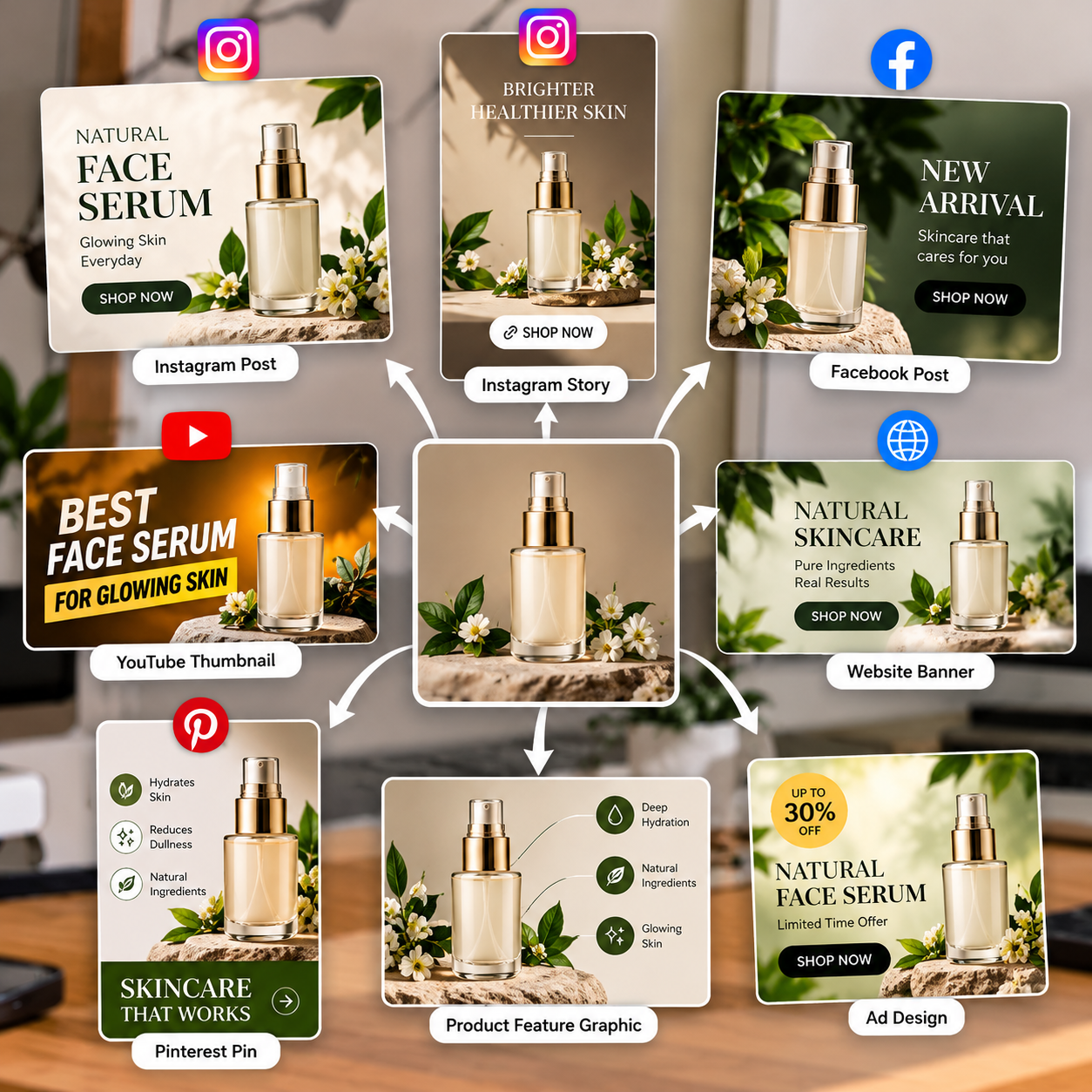
How to Turn One Product Photo Into Multiple Social Media Designs
Creating social media content regularly can take a lot of time, especially when you run a small business or manage several products. The good news is that you don't need a new photoshoot for every post. One good product photo can be used to create multiple designs for different platforms.
The key is to change the layout and purpose of the design while keeping the product looking accurate and professional.
1. Start With a Good Product Photo
Choose a clear, high-quality image with good lighting and visible product details. A clean original photo gives you more flexibility when creating different designs.
If the background is distracting, you can remove it and place the product on different backgrounds depending on the design.
2. Create an Instagram Post
Use the product photo as the main focus of a square or portrait post. Add a short headline, your brand colours, and a simple call to action.
For example, a skincare brand could highlight a new product, while a clothing store could showcase a new arrival.
Keep the design clean so the product remains easy to notice.
3. Turn It Into a Story
Stories have a different layout from regular posts. Place the same product photo in a vertical design and leave enough space for a headline, offer details, or a link sticker.
You can use this format for limited-time offers, product announcements, and quick promotions.
4. Design a Promotional Banner
Use the original photo to create a wider banner for your website, online store, or advertising campaign.
Adjust the product position to fit the layout and keep important text away from the edges. You may need a little extra space around the product to make the design look balanced.
5. Create a Product Feature Graphic
Instead of promoting the product alone, use the same photo to highlight one specific benefit or feature.
For example, a bag could be featured in a design about storage space, material, or everyday use. Keep the information accurate and easy to read.
6. Make a Pinterest Pin or Catalogue Image
A vertical Pinterest design can use the product photo with a clear headline and a few useful details. For a catalogue, keep the product image larger and the supporting information simpler.
Different formats help you reuse the same photography for different content needs.
7. Use Templates to Save Time
Once you have a few designs you like, save them as reusable templates. For your next product, you can replace the image, update the text, and adjust the colours without starting from scratch.
Tools such as PixCutly can help with product image editing and background removal, making it easier to prepare images for different creative layouts.
Final Thoughts
One product photo can do more than serve a single post. With a little planning, you can turn it into an Instagram post, Story, promotional banner, feature graphic, or catalogue image.
Start with a good original photo, choose the right layout for each platform, and keep your brand style consistent. This simple approach can help you create more content without arranging a new photoshoot every time.Repurpose product photos to create multiple social media designs for Instagram posts, Stories, banners, and promotions.